


Have you ever been browsing a website, clicking refresh a few times, only to be met with a sudden, frustrating message: “ACCESS DENIED” or “Your IP has been banned”? It feels like a door slamming shut for no reason. You weren’t doing anything wrong, yet you’re instantly blocked from the information you need. Select the best proxies for social media accounts.
This digital cold shoulder often happens because a website’s automated security mistakes your normal browsing for a bot. After a few quick requests from the same online address, these systems can lock you out to protect themselves. In practice, many users get blocked simply for comparing product prices or looking for the best flight deal a little too quickly.
But what if you had a magic key that let you knock on that door with a new, friendly face every single time? That’s the core idea behind rotating proxies. Instead of always showing the same online address, this powerful tool automatically provides a fresh one for each new request. This simple switch is the secret to true anonymous browsing, making it nearly impossible for a site to recognize and block you.
This guide will show you exactly how to bypass those frustrating website blocks, troubleshoot common issues, and even unlock better prices online—no technical background needed. By the end, you won’t just understand the problem; you’ll feel empowered to solve it for good.
What Is Your “Digital Address” and Why Do Websites Care?
Think of your connection to the internet like a house on a street. To receive mail, you need a unique address. Online, this digital address is called an IP address. Every website you visit sees this address, identifying your specific connection out of billions around the world. It’s the fundamental way the internet knows where to send the data you’ve requested, like a webpage or a video.
But this digital address does more than just receive data. Websites use your IP address like a caller ID. They can see where you are in the world, which allows them to show you different prices or content. If you visit a site too often or too quickly, they might flag your IP as suspicious and block it entirely—the digital equivalent of a bouncer denying you entry because they recognize your face.
Because your internet connection is tied to this single, public-facing IP, you have very little control. If you get blocked, you’re stuck. If you want to see prices from another region for more anonymous browsing, you’re out of luck. What if you could stop showing your real address and use a different one instead?
The Simple Detour: Hiding Your IP with a Proxy Server
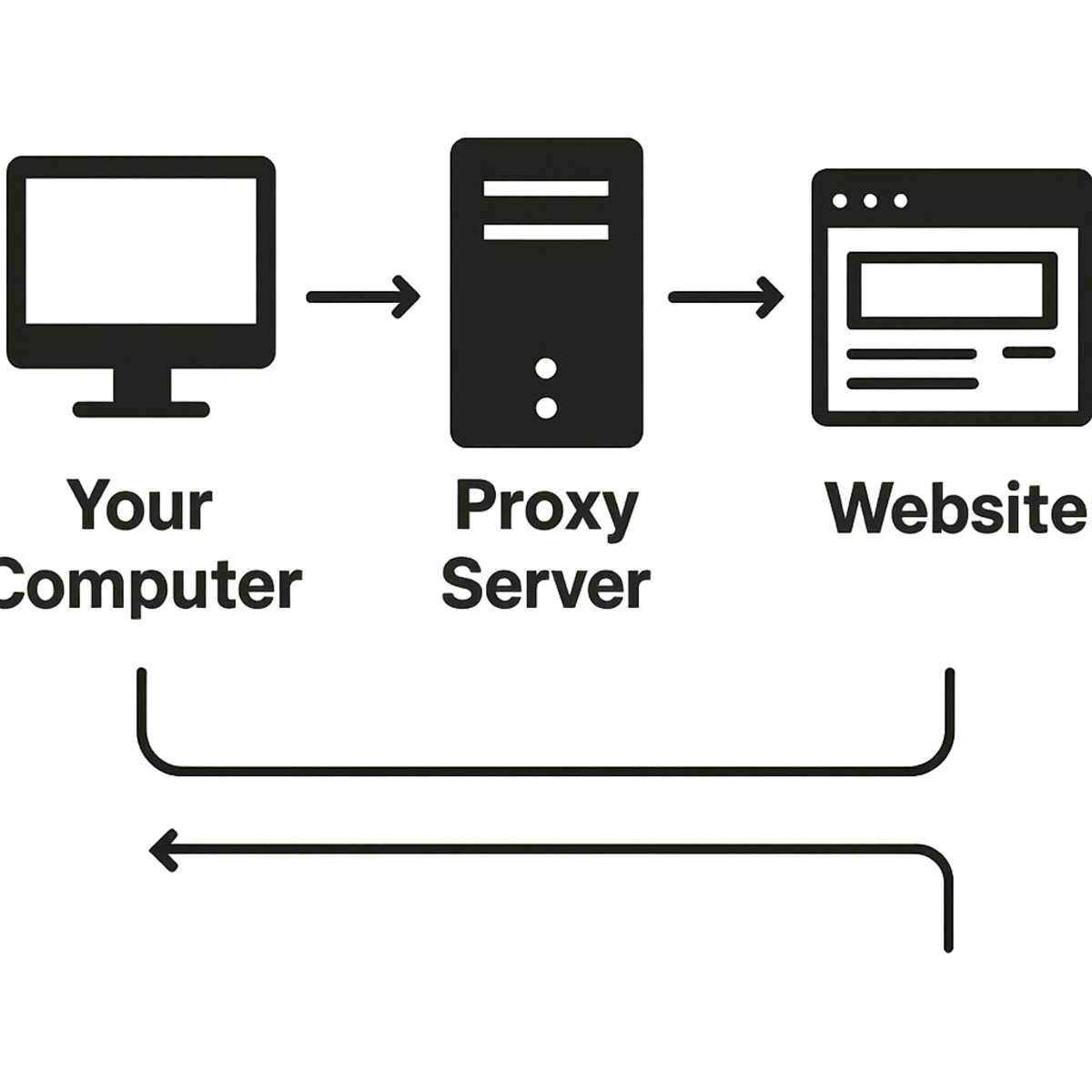
This is where a middleman, known as a proxy server, comes into play. Imagine it as a P.O. Box for your internet connection. Instead of sending a request directly from your home’s address (your IP), you send it to the P.O. Box first. The proxy server acts as this secure mailbox, receiving your request before it continues to its final destination. It’s a simple detour that changes everything about how a website sees you.
From there, the proxy forwards your request to the website. To the website, it looks like the request came from the proxy’s location and IP address, not yours. Any information the website sends back goes to the proxy first, which then passes it along to you. This powerful redirection keeps your personal IP address completely hidden, giving you a new digital identity to browse with more privacy and freedom.
However, there’s a catch with this basic setup. You’ve been given one new identity—one new IP address. This is often called a static proxy because the address doesn’t change. While it works for a while, what happens if a website flags and blocks that single proxy IP? You’re right back where you started, with a door slammed shut. You’ve effectively just been given one disguise, and once it’s discovered, your access is gone.
Why One “Disguise” Isn’t Enough: Introducing IP Rotation
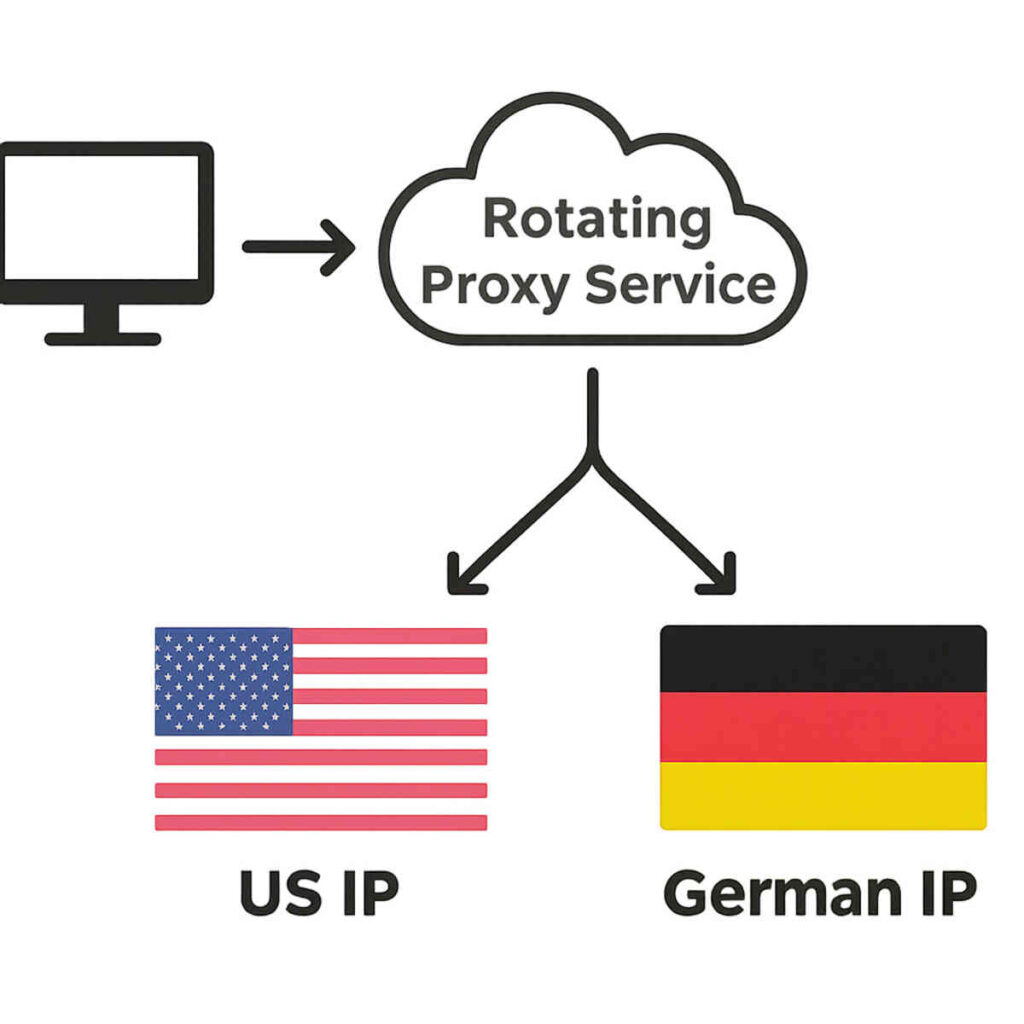
The problem with a single disguise is that it eventually becomes recognizable. So, what if instead of one P.O. Box or one disguise, you had access to a whole warehouse full of them? This is the core idea behind a rotating proxy. Instead of giving you a single, static IP address that can be flagged and blocked, a rotating proxy service manages a huge collection—sometimes millions—of different IP addresses. It then automatically swaps them out for you.
This process, called IP rotation, makes your connection a constantly moving target. It’s a simple but incredibly powerful system that works in the background to keep you from ever looking suspicious to a website’s security. For you, the experience is seamless. It happens automatically with every new request or after a set amount of time.
To a website, it looks like this:
- You make a request to a website (e.g., clicking on a product). The rotating proxy service assigns you a fresh, clean IP address (IP #1).
- You make a second request (e.g., refreshing the page or clicking another link). The service instantly and automatically gives you a different IP address (IP #2).
- For your third request, you get IP #3, and so on.
Because your IP address changes constantly, it’s nearly impossible for a website to track your activity back to a single source and block you for making too many requests. You’re no longer one person knocking on the door a hundred times; you’re a hundred different people each knocking just once.
Problem #1: “I’m Using a Rotating Proxy But Still Getting Blocked!”
You’ve set up your rotating proxy, feeling confident that you’ve outsmarted the system. You start browsing, only to be met with that same frustrating “Access Denied” screen. How is this even possible? The answer lies in a simple but crucial detail: not all IP addresses are created equal, and websites can tell the difference.
Many rotating proxies pull their IPs from Datacenter IP pools. Think of these addresses as coming from a massive, commercial office park. They are perfectly functional, but websites know that regular people don’t typically browse the internet from a server farm. Because of this, traffic from a datacenter IP can sometimes be viewed with suspicion, especially by websites with tight security, like sneaker stores or airline ticket sites.
On the other hand, the most effective services use Residential Proxies. These proxies use IP addresses that are assigned by real Internet Service Providers (like Comcast, AT&T, or Verizon) to actual homes. When you use a residential IP, your connection looks completely natural to a website—as if you’re just another person browsing from their living room. This high level of trust is often the secret ingredient needed to automatically avoid IP bans on tricky websites.
So, if you’re still getting blocked, the type of IP in your rotating pool is the most likely culprit. For simple data gathering on open websites, datacenter proxies might be fine. But for accessing high-demand products or scraping secure sites without interruption, choosing residential proxies is almost always the right move.
Problem #2: “My Connection is Suddenly Super Slow!”
You’ve successfully dodged the block and are now browsing freely, but there’s a new problem: every page takes ages to load. This frustrating slowdown is a common trade-off when using proxies, and it usually boils down to two simple factors: distance and quality. Think of your internet connection as a package delivery. Normally, it goes straight from your computer to the website. A proxy, however, adds a mandatory stop along the way, and that detour takes time.
The single biggest reason for a slow connection is geographical distance. When you use a proxy, your internet request doesn’t go directly to the website. Instead, it travels from your computer to the proxy server first, and then to the website. If you’re in New York but your proxy server is in Australia, your data has to make a round trip across the globe just to load a single page. This physical distance creates a noticeable delay, often called latency.
Beyond just distance, the quality of the proxy itself plays a huge role. Not all servers are built on the same digital “highway.” A high-quality proxy has plenty of power to handle requests quickly, but a cheaper or overloaded one acts like a digital traffic jam. Even with the best rotating proxies, your automatic IP address switching setup might occasionally land on an IP address that is currently experiencing heavy traffic, causing a temporary slowdown before it rotates to the next one.
For the fastest experience, the solution is to select a proxy location that is geographically close to you or, even better, close to the website’s own servers.
Problem #3: “How Do I See Prices or Content from Another Country?”
Sometimes, the whole point of using a proxy isn’t just to hide your location, but to intentionally change it. Have you ever noticed that a video is “not available in your region” or suspected that flight prices change depending on where you’re searching from? You’re right. This is called geo-targeting, a common practice where websites show you different content or prices based on the country your IP address is from. This is where a rotating proxy becomes your digital passport.
Imagine you’re looking for a flight from New York to Rome. By using a proxy service, you can specifically choose to route your connection through an IP address in Italy. When you visit the airline’s website, it sees an Italian IP and may show you prices meant for the local market, which can often be significantly cheaper. The most effective way to do this is with residential proxies, as your connection appears to be coming from a real home in that country, making it completely legitimate in the eyes of the website. This allows you to easily shop around the globe for the best deals without leaving your chair.
The key is to use a proxy provider that lets you select your desired country. This simple feature unlocks a world of content and potential savings. By using geo-targeting with different IPs, you can compare international product prices, access region-locked streaming libraries, or see how a website looks to users in another part of the world. While this powerful technique helps you bypass website rate limits, some sites may still become suspicious if you make too many requests too quickly, often leading to the dreaded “I’m not a robot” checkbox.
Problem #4: “The Website Asks Me to Solve a CAPTCHA on Every Page!”
That frustrating moment when you’re stopped dead by a grid of blurry traffic lights or a “Click to prove you’re human” checkbox is a website’s way of being cautious. This happens when the site is suspicious of your connection, and the source of that suspicion is often something called IP Reputation. Think of it as a trustworthiness score for your digital address. If an IP address has been used for spammy or aggressive behavior in the past, its reputation drops, and websites will constantly challenge it with security checks.
This is where the quality of your proxy service becomes critical. Remember the difference between datacenter and residential IPs? Datacenter IPs, coming from commercial servers, are often used for high-volume automated tasks. As a result, many IPs in residential vs datacenter IP pools have a lower reputation score, making them prime targets for CAPTCHA challenges. A high-quality residential IP, on the other hand, is borrowed from a real home internet connection and carries a pristine reputation. To a website, you just look like another regular visitor browsing from their couch.
If you find yourself constantly solving puzzles, it’s a sign your proxy is using a pool of overused, low-reputation IPs. The best rotating proxies don’t just swap your address; they manage a clean pool of high-reputation IPs. This is how to avoid IP bans automatically and also sidestep the constant interruptions that slow you down.
Problem #5: “Is Using an IP Rotator Even Legal?”
This is a fantastic and important question. The short answer is yes, using a rotating proxy is completely legal. Think of it like a tool, such as a hammer. A hammer is legal to own and use for building a birdhouse, but it would be illegal to use it to break into a home. The tool itself is neutral; what matters is how you use it.
For all the purposes we’ve discussed—comparing prices, gathering public product reviews, or managing your small business’s social media account—the use of rotating proxies falls well within legitimate and ethical boundaries. These activities are about accessing publicly available information more efficiently and overcoming frustrating technical roadblocks. You aren’t breaking any laws by looking for a better deal on a flight or making sure your company’s ads are appearing correctly in different cities.
The line is crossed when the underlying action is illegal or malicious. Using a proxy of any kind to hack into accounts, send spam, create fake profiles to harass others, or steal private information is, of course, illegal. The proxy doesn’t change the nature of the act; it just provides a layer of anonymous browsing that some people try to exploit for illicit purposes.
Ultimately, the ethical guideline is straightforward: if what you want to do is legal and acceptable without a proxy, it’s still legal and acceptable with one. The goal is to ensure fair access and privacy, not to hide wrongdoing.
How Do I Actually Use a Rotating Proxy?
This might sound like the part where you need a degree in computer science, but the reality is much simpler. A good provider of rotating proxies does all the complicated work for you. Your job isn’t to build the engine; it’s just to turn the key. A good automatic IP address switching setup is designed to be just that—automatic. For the user, this process usually boils down to one of two straightforward methods.
Once you sign up with a provider, they will give you simple instructions for getting started. Most non-technical users will find the following options incredibly easy to manage:
- Browser Extension: This is often the easiest path. It works just like installing an ad blocker. You add an extension to your web browser (like Chrome or Firefox), log in, and click a button to turn the proxy on or off. It’s that simple.
- System Settings: This method sounds more technical but is still very manageable. Your provider gives you a special “address” and “password.” You copy and paste these into your computer’s network settings one time. The provider will have a step-by-step guide with pictures, and once it’s done, all your internet traffic is routed through the proxy automatically.
You don’t need to be a tech expert. The best service for your needs, whether for comparing prices or gathering public information, will make this setup a breeze. Once you’re connected, the proxy works silently in the background, swapping your IP address as needed without you having to do a thing. It’s a set-it-and-forget-it tool that opens up the internet.
How Much Does This “Magic Keychain” Cost?
So, what’s the price tag on this online freedom? The cost of IP rotation services is a bit like budgeting for electricity or your phone’s data plan—it’s not a single flat fee, but rather a cost based on what you need and how much you use. A simple plan for occasionally checking flight prices from different locations will be far more affordable than a heavy-duty plan used to gather thousands of product details every day. The price scales with your ambition, ensuring you only pay for the power you actually require.
The two biggest factors that determine the price are the type of IP address and the amount of data you use. As we discussed, residential proxies use real IP addresses from homes, making them the most trustworthy and effective for avoiding blocks—and also the most premium option. Cheaper datacenter proxies can still be useful, but they’re more easily flagged. After that, providers measure your usage in gigabytes (GB), just like a mobile data plan. Simply browsing websites uses very little data, while downloading many high-resolution images or videos will use more.
Ultimately, the question isn’t just about cost, but about value. If a $15 per month plan helps you find a plane ticket that’s $200 cheaper, the service has more than paid for itself in a single use. If it prevents your small business’s social media account from getting mistakenly flagged and blocked, the value is peace of mind. The cost is an investment in overcoming the specific digital wall you’re facing.
Your Action Plan: Going from Blocked to Unstoppable in 3 Steps
That “ACCESS DENIED” screen no longer has to be a frustrating dead end. Before, it was a mysterious wall; now, you see it for what it is—a simple digital bouncer that recognized your IP address. You’ve traded confusion for clarity, understanding the tools that grant you uninterrupted access. This knowledge of how to avoid IP bans automatically shifts you from a passive user into an empowered navigator of the web.
Putting this power into practice is simpler than you think. For your next step with rotating proxies, just follow this plan:
- Identify Your Problem: Are you getting blocked, seeing inflated prices, or just trying to manage different accounts?
- Choose Your Tool: For most everyday issues, a residential rotating proxy is the most reliable choice.
- Start Small: Look for an IP rotation service with a free trial or a flexible plan and an easy setup, like a browser extension.
You don’t need to be a technical expert to solve these problems, whether for price comparisons or light web scraping. Think of this new skill not as a complex system to master, but as a single key that opens countless doors. Start with one, and see what you can unlock.
